Feature by feature
Candy AI features, each one tried in use
I came for Shorts and stayed for things I had never planned to try. The subscription covers much more than the series catalogue, and some of it is good while some is not worth spending your tokens on. These are my notes, feature by feature, written from actual use and not from reading the feature list.
Click any box below and its feature opens right under it, with a description of the experience, the steps that matter and an honest verdict.
Elliot Shaw·Using Candy AI since early 2026·Last checked on 10 September 2026
 Open Candy AI
The one I expected least from, and the one I open most
AI chat
I took it for a chatbot in a wig. Then one Tuesday afternoon I opened a conversation to kill ten minutes between two jobs, and looked up forty minutes later. Nice prose is not what kept me there, since plenty of models write nicely. What kept me was that the character holds its ground. Disagree with them and they disagree back. Bring up something that clashes with what they said twenty messages ago and they spot it. That is rarer than it sounds, and it is the difference between talking with a character and typing at a very polite autocomplete.
The verdictOf all the features, this is the one I would miss. You can decide on the free tier alone: once you hit the message limit, you will already have your answer.
What the screen looks like
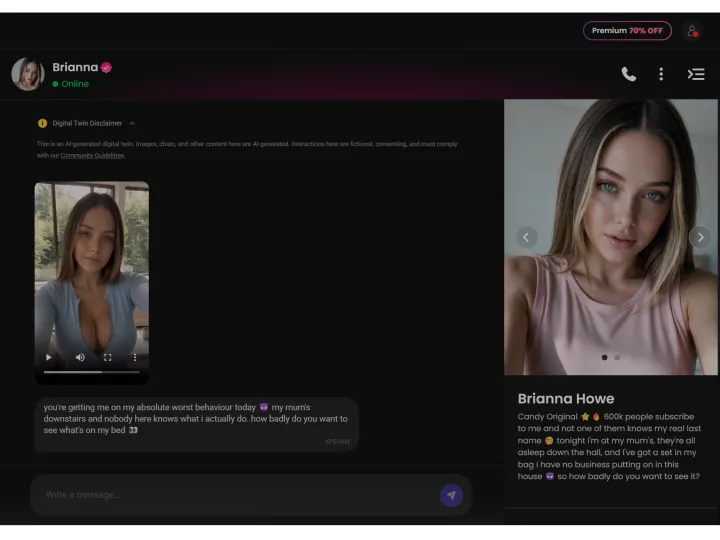
Nothing needs explaining here, and I mean that as praise. A searchable list of your conversations sits on the left, the thread in the middle, and the message box at the bottom, right where years of messaging apps taught you to look. The top bar carries the character’s avatar and name, then a row of icons: one each for calls, gifts and a context menu, plus a toggle for the side panel at the far right.
Tap that toggle and a full profile card slides out for the character you are talking to: a photo carousel, a short bio and a list of attributes covering age, body, ethnicity, language, relationship status, occupation, hobbies and personality. Read the personality line before you send your first message; it says a lot about what is coming. One character I opened was tagged “sarcastic, bratty, secretly emotional”, and as warnings go, it was accurate.
How the characters write
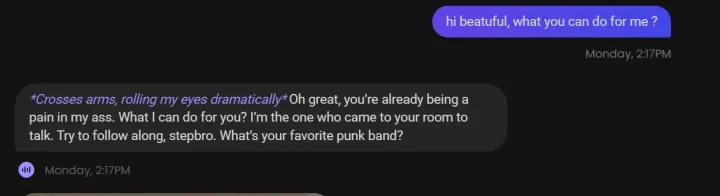
Roster characters reply in roleplay style. Physical actions appear in italics between asterisks, speech appears as plain text, and the two are woven together much like a good tabletop player narrates a turn. It takes a message or two to adjust, and after that you stop noticing.
The creator-style ones, marked with the Candy Original badge, write in a completely different way: all lowercase, several short messages in a row, not one asterisk. They message the way a person does and skip the character-style narration. You only learn which kind you picked when the first reply arrives, and that difference matters more than any setting you could change.
Underneath both sits a consistent voice. Treat a sarcastic character kindly and it stays sarcastic. A shy one will not turn bold simply because you pushed the scene that way. You can steer the conversation anywhere, and the character follows, but by its own route and without swapping personality to match your request. That small resistance is why it feels like talking to somebody.
Group chats change the dynamic
A “New Group” button at the top of the conversation list puts several characters into one thread. Everything shifts: they answer each other as well as you, and you may find yourself just watching two of them bicker for longer than you expected.
It is also where the seams show first. With two strong personalities in the room, they sometimes talk past each other instead of to each other. Try it, but one-to-one conversations remain where the product shines.
Premium vs a free account
Free tier
- Chat with any character on the roster
- The whole chat interface, profile panel and search included
- A limited number of messages; Candy AI does not publish the exact cap
- Group chats too
With Premium
- Unlimited text messages
- No interruption when a conversation is going well
Step by step
- 1Pick or build a characterLook through the available characters, or design one of your own in the creator.
- 2Just typeThe layout is the messenger one you know. Paid plans have no message limit.
- 3Open the profile panelThe icon at the far right of the chat header shows attributes and personality.
- 4Request a sceneUnder the input box, the Image and Video buttons turn your current moment into media.
- 5Add charactersPress “New Group” to put several of them in one thread.
Key facts
- Interface
- List of conversations, thread and input box, with nothing to learn
- Writing style
- Roleplay: narrated actions in italics, dialogue in plain text
- Consistency
- Personality and context hold from start to finish
- Profile panel
- Personality, hobbies, occupation, relationship, language, ethnicity, body and age
- Group chats
- Available, including on the free tier
Official website · 18+
You never write a prompt, and that turns out to matter
Image generation
I had been chatting for twenty minutes before I noticed the Image button. It sits quietly under the message box, next to the words “Show me the scene”, and those words are the whole design. You write no prompt, because the conversation already wrote it and the button just cashes it in. I found that clever and a little disarming: what comes back is exactly what you were describing thirty seconds earlier, which feels nothing like typing keywords into an empty field.
The verdictNo other part of the platform is designed as thoughtfully, and no other feature can be judged fairly without paying. Skipping the prompt is worth more than a slightly sharper image.
What happens when you press it
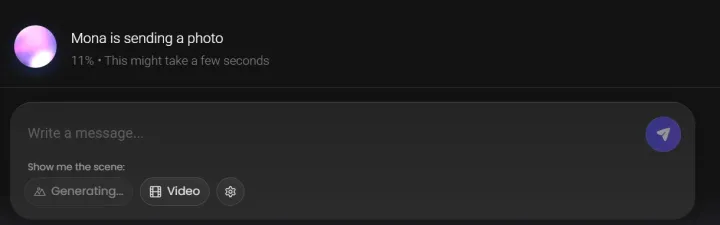
A progress line takes the place of the reply: “Mona is sending a photo”, a percentage climbing, and a note that it may take a few seconds. In my test the wait was closer to ten seconds than a few, and that is fine: you watch the counter much as you would watch someone typing. The Image button turns grey and reads “Generating…” until the picture arrives, so you cannot fire off a second request by accident.
This is deliberate, and it works: the picture feels like something the character sent, not something a tool produced.
How closely it follows the conversation
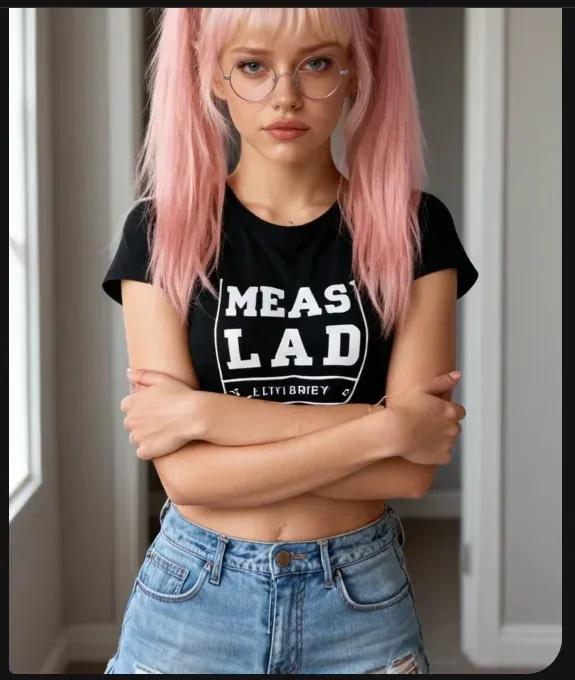
I wanted a real test, so I set one up. The character’s last message was a narrated action in which she stood with her arms folded in her room, in the middle of an argument. I typed nothing and pressed Image. The result showed her in a bedroom with folded arms, dressed as that character would dress, and with the hair and glasses of her profile photo.
Two things stand out. The scene followed the conversation without any description from me, and the likeness held: she was clearly herself, not a generic image that happened to share a hair colour. Keeping a character consistent from one generation to the next is the hard problem in this field, and it is the reason to choose this over a general-purpose image tool.
Where the results are stored
Each generation is saved in Collection, in the left sidebar. It looks like tidying until you have scrolled back through four hundred messages looking for one picture. Whatever is worth keeping has already been kept.
Premium vs a free account
Free tier
- Image generation in the chat works without paying
- Finished images come with no blur and no watermark
- All your generations are saved in Collection
With Premium
- Explicit (18+) output from image generation
- The 100 tokens a month that generation draws on
- Volume, since the free allowance runs out fast
Step by step
- 1Built from contextThe scene comes from the conversation, so you have no prompt to write.
- 2Delivered as a messageIt shows up in the thread as if the character had sent it.
- 3Stable likenessGeneration after generation, the character still looks like themselves.
- 4Kept in CollectionResults are saved instead of vanishing up the thread.
Key facts
- Location
- In the chat, under the message box
- Input
- The conversation; it has no prompt of its own
- Wait time
- Around ten seconds, with a progress percentage on screen
- Consistency
- The character keeps the same likeness from one generation to the next
- Free tier
- Available, in limited amounts
- Cost
- Paid in tokens; a paid plan includes 100 a month
Official website · 18+
The same idea in motion, and several times as expensive
Video generation
One click to the right of the Image button you find Video, and it costs far more. A single evening taught me that, and used up a good share of a month’s tokens. Of the two, it is clearly the younger. Images feel like a solved problem, while video still feels unfinished: clips are short and results swing more from one attempt to the next. I am glad I tried it, but once the token cost sank in, I stopped reaching for it casually.
The verdictFun to try, expensive to depend on. Do not subscribe for this: if you want video, Shorts gives you more for the same money.
What you get
Short vertical clips, shaped like Shorts. You start one the same way as an image, from the “Show me the scene” row, pressing Video instead of Image, and the clip appears in the thread in the same way.
As you would expect, you wait longer than for a still. The bigger difference is how much the attempts vary: two generations from a similar point in the same conversation can come back at clearly different levels of quality. With images I stopped double-checking after a while. With video I have not.

The token arithmetic
Work this out before you start, not after. A paid plan includes 100 tokens a month, and each video generation costs noticeably more than an image, so an evening spent on clips drains the allowance far faster than one spent on stills.
My honest advice: if video generation is what pulls you towards a subscription, look at Shorts first. Shorts is the same idea made professionally: complete series, well produced, and included in the subscription with no tokens spent per view. Making your own clips is the fun toy; Shorts is what you will actually watch to the end.
Premium vs a free account
Free tier
- You can see the button and where the feature lives
- Little else: of the generation tools, this one is the most clearly gated
With Premium
- Explicit (18+) output from video generation
- The 100 tokens a month that the feature draws on
- The “Full Live Action” experience listed on the plan page
Step by step
- 1Started as with imagesUse the “Show me the scene” row in the chat and press Video, not Image.
- 2Short clipsShort vertical output, like Shorts.
- 3Longer waitSlower than a still, and the quality varies more.
- 4More tokensEvery generation costs noticeably more than an image.
Key facts
- Location
- In the chat, beside image generation
- Length
- Short clips, not long scenes
- Consistency
- More variation between attempts than with images
- Cost
- Paid in tokens, and clearly more than for images
- Plan
- A paid plan is required
Candy AI Shorts is the professionally produced version of the same idea: whole episodic series, covered by the subscription with no tokens spent per episode.
Generate a videoOfficial website · 18+
I would have skipped it on a feature list
Voice and calls
No other feature surprised me like this one, and a spec sheet would have made me ignore it. When you read text, the delivery is something you invent yourself, in your head. Audio removes that job and makes the choice for you. Suddenly the character has a specific way of hesitating before an answer, and that one change sells the illusion better than any upgrade to the writing could. Many people never tap the call button, which is small and sits in the chat header next to the name.
The verdictTap the phone icon at least once before you make up your mind about the platform. It changes the experience, and it is the strongest argument for paying.
Two modes under one name
There are two modes in practice, and they feel like different products. Voice replies come first: a message comes back as audio in place of text, and you press play as you would on a friend’s voice note. It fits into a written conversation without upsetting its rhythm.
Then there is the live call, which you start with the phone icon in the chat header. That is a different experience altogether: nothing to type, nothing to read, just conversation moving at the natural pace of speech. It is also the mode where latency shows most, since a pause that reads as thoughtful in writing reads as lag when you are waiting for a voice.

The voice belongs to the character
You do not pick a voice once in a global setting. It belongs to the character and is chosen at creation, so a custom character gets a voice as part of the build, not as an afterthought. Roster characters come with one already.
In practice, if a voice does not match the character you imagine, the fix is to build your own character, not to change a setting.
Premium vs a free account
Free tier
- You can see the call button and voice controls
- The voice features themselves are on the paid tier
With Premium
- Audio replies to your messages
- Live calls with a character
- A voice for each character you build
Step by step
- 1Voice repliesA reply can come as audio instead of text.
- 2Live callsStart talking by tapping the phone icon at the top of the chat.
- 3A voice per characterEvery character has its own voice, picked when it is created.
Key facts
- Location
- In the chat header, next to the character’s name
- Modes
- Two modes: voice replies and live calls
- Chosen at creation
- Custom characters receive a voice during the build
- Plan
- A paid plan is required
Official website · 18+
Ten minutes planned, half an hour gone
Character creator
You get no prompt box, and I suspect that is deliberate. The builder leads you through one decision per screen, with large preview cards and a Next button that stays grey until you choose. That pace makes you take it more seriously than a text field would. The order is style, ethnicity, hair, build and, last, a name. When the name finally comes, you have already made so many small choices that the whole thing stops feeling like product setup. It is a design trick, and knowing that did not stop it working on me.
The verdictThis is the feature that makes a subscription stick. Run it for free, look at what is offered, and decide afterwards.
A tour of the builder
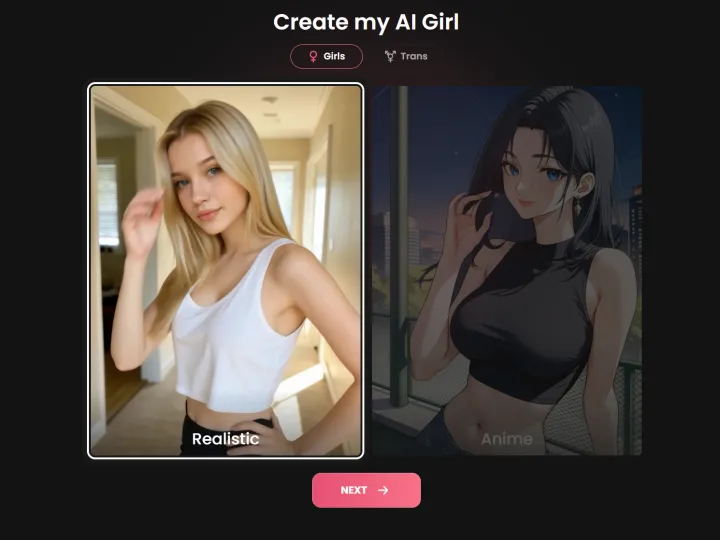
Screen one asks whether you want Girls, Guys or Trans characters. Style comes next: Realistic and Anime appear as two big preview images, not a dropdown. Whole pictures instead of labels make a small difference, because you are less likely to pick the wrong one.
After that, each screen deals with one attribute. Ethnicity: Caucasian, Asian, Black / Afro, Latina, Arab. Hair covers cut and colour: the cuts are straight, bangs, curly, bun, short and ponytail, and the colours sit next to them. Body type: skinny, athletic, average, curvy, BBW, then separate choices for proportions. Nothing hides in a menu; all options sit on cards in plain view.
Where the personality gets decided
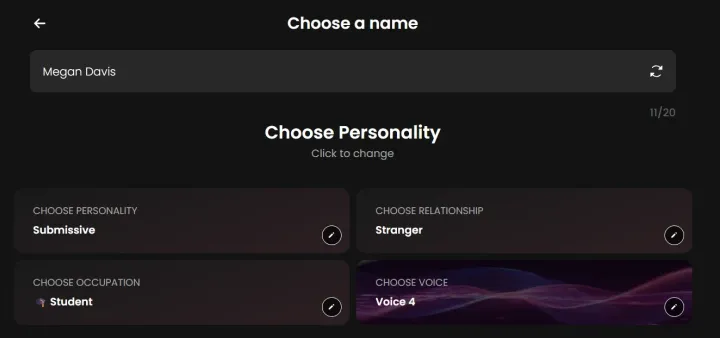
The interesting part is the final stretch. You are offered a name, with a reroll button if you dislike it. Next come four cards that define who the character really is: their personality, how they relate to you, their occupation and their voice. This step decides whether you are still chatting with them a week from now, and it is the one people rush.
Notice that you choose the voice here, next to the personality, and not later in a settings menu. It is treated as part of the character’s identity, not as a playback preference.
Before building, I looked at the profile panels of a few roster characters, and I suggest you do the same: they show exactly how a personality is squeezed into a few words. One I checked read “sarcastic, bratty, secretly emotional”, and those three words really did predict the conversation. Treat the trait screen like writing a character brief, not filling in a form.
What happens on a free account
Paying is not required to use the wizard: every screen and option is there, right down to the final loading step. What you do not get is the character. I ran the whole thing on a free account, then checked the roster under “My AI”, and it was still empty.
So treat the free run as a look at the options, not as a route to a free character. For that purpose it is genuinely handy: you see exactly what you could build before deciding whether the subscription is worth it.
Premium vs a free account
Free tier
- Run the full wizard and see every option
- A useful preview of what you could build
- Nothing is created at the end
With Premium
- The ability to create a character for real and keep it
- It appears in your roster and in chats like any other
- A voice assigned to it while you build
Step by step
- 1Step 1 — Type and stylePick Girls, Guys or Trans, then Realistic or Anime on two big preview cards.
- 2Step 2 — Ethnicity and ageEthnicity comes as preview cards; age is a slider from 18 to 39+.
- 3Step 3 — HairCut and colour in one step, from straight and bangs to curly, bun, short, ponytail and other cuts.
- 4Step 4 — Body typeSkinny, athletic, average, curvy or BBW, plus proportion options.
- 5Step 5 — Name and characterA suggested name you can reroll, then four cards for personality, relationship, occupation and voice.
Key facts
- Format
- A step-by-step wizard with one choice per screen
- Styles
- Realistic or Anime
- Character types
- Girls, Guys or Trans characters
- Age
- A slider that starts at 18, which is the minimum and not a preset
- Free tier
- The wizard is open to you, but no character gets created
- Result
- Your own character in your roster, chatting like every other one
Official website · 18+
The feature that surprises you on the bill
Private content
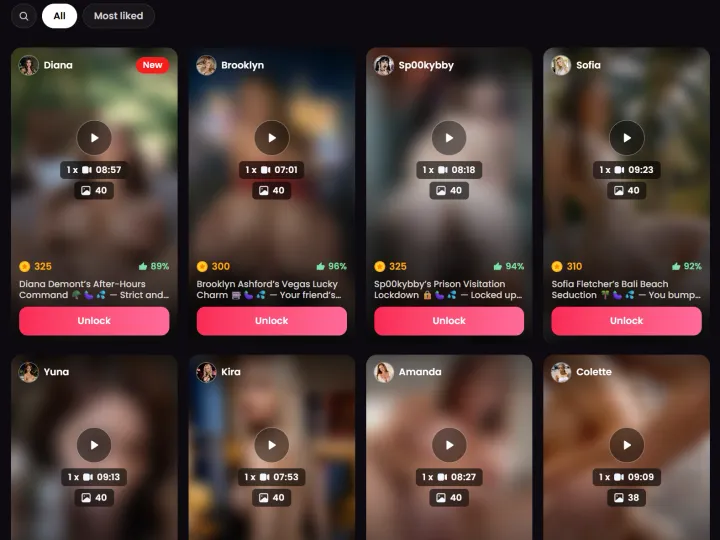
A new subscriber is more likely to stumble on this than on anything else, and I did too. At first glance it looks like Shorts, a grid of video cards with runtimes and like counts, but it works in a completely different way. The items are longer and standalone, and every card has its own token price. The subscription does not cover them. If you come from Shorts, where subscribing unlocks everything, this is a genuine trap, and the interface gives you no warning until you are already inside.
The verdictRead the token price on the card first, then click. That is the whole of the advice, and if you simply want something to watch, Shorts is better value.
How to read a card
Before you click anything, learn the four numbers on each card. In the corner there is a runtime, usually eight or nine minutes, nothing like the short episodes in Shorts. Then a photo count, since every item bundles stills with the video. Next to a star is a token price, the cost of unlocking. And beside a thumbs-up, a percentage: the approval rating from people who have already bought it.
Watch that last number. Filtering amounts to a search box and an All / Most liked toggle, so the approval rating is your only hint of quality before you spend tokens on something you cannot preview.
Characters have their own
A second way in is easy to overlook. In the chat, open a character’s profile panel and you will find a “My Private Content” section with its own count: exclusive photos and videos tied to that one character.
In my view that is the better offer than the main feed, since it is linked to someone you are already talking to and not a catalogue you scroll through cold.
Private Content next to Shorts
The difference that matters: Shorts comes as episodes in full series, all of it included in the subscription. Private Content, by contrast, is longer standalone items, and each one is bought separately with tokens.
If watching is your goal, Shorts gives you far more per euro. Private Content makes sense when you want one specific character or item, not as a way to fill an evening.
Premium vs a free account
Free tier
- Scroll the whole feed and look at every card
- All runtimes, like counts, token prices and match scores can be seen
- Nothing unlocks without tokens
With Premium
- The 100 tokens a month, which are what you unlock items with
- A character’s own private gallery, reached from their profile panel
Step by step
- 1Scroll the feedFiltering is a search box and an All / Most liked toggle. The card itself gives runtime, photos, price and approval rating.
- 2Pay in tokensEvery item has its own price, displayed on the card before you open it.
- 3Or begin with a characterThe profile panel in the chat has a dedicated “My Private Content” section.
Key facts
- Format
- Standalone videos of eight to nine minutes, each bundled with roughly 40 stills
- Pricing
- Priced item by item in tokens; the subscription does not cover it
- Card data
- Runtime, photo count, token price and approval rating
- Sorting
- Search box plus an All / Most liked toggle
- Vs Shorts
- Shorts are episodic and included; these are single unlocks paid in tokens
Official website · 18+
Plain plumbing, not glamorous, but you would miss it if it vanished
Discover and Collection
These two minor features go together in my head: neither would make a headline, but both colour everything else. Discover is where to scroll when you cannot decide who to talk to; two of the three characters I kept came from there. Collection is the other end of the pipe: all your generations in one place instead of lost forty messages back in a thread. Nobody subscribes for these, but if they disappeared you would notice at once.
The verdictLittle to judge here, but visit Discover early: picking a character at random is the slowest way to begin.
Why Discover is the place to start
Start with Discover. It is a feed of posts from characters across the platform, and spending two minutes scrolling it reveals more about who deserves a click than a grid of names ever could. A roster this big makes choosing cold the slowest start there is.
It is also where you run into characters you would never have searched for, which is the point of a feed. My advice to any newcomer: open Discover before the character list.
Why Collection matters more than it seems
Every generation ends up here. Housekeeping, you might think, until you need an image from a conversation three days back and find that the other option is scrolling through several hundred messages.
Beside it, “My AI” holds the characters you created or added. The pair stores your creations apart from the conversations that produced them, which is the right way round.
Premium vs a free account
Free tier
- You can browse the whole of Discover
- Collection keeps whatever you generate on the free tier
- My AI is present but empty until you can create characters
With Premium
- More to put in Collection, since generation is what produces volume
- My AI begins to fill once character creation is truly open to you
Step by step
- 1DiscoverA scrollable feed of character posts from the whole platform.
- 2CollectionThe images and videos you generated, kept instead of lost in a conversation.
- 3My AIYour roster of characters you created or added.
Key facts
- Discover
- Character posts from across the platform, in a single feed
- Collection
- Everything you generated or saved
- My AI
- The characters that belong to you
- Free tier
- Both are usable
Official website · 18+
Looking for Shorts?
There is a separate guide for the episodic series, covering what is in the catalogue, how it is rated, how to get in and what it costs.
Try the features yourself
on Candy AI’s own site
- Shorts, chat, voice and characters sit under a single subscription
- Image and video generation use a monthly token allowance
- You can browse free of charge before deciding
Official website · 18+
Your questions, answered
Is every feature a separate purchase?
No. Everything sits under one Candy AI Premium subscription: Shorts, chat, voice calls and the character creator. Two things come on top of it. Image and video generation spend a monthly token allowance, and each Private Content item is unlocked on its own, also with tokens.
What do tokens pay for?
Think of tokens as a second wallet, kept apart from the subscription and topped up with 100 a month on a paid plan. They pay for image and video generation and for single Private Content videos, while chat messages never cost any. Watch the balance: I used up a month’s supply in one evening.
Can you use Candy AI without any adult content?
Partly. Text chat and the character creator can be used without producing adult material. Even so, the platform is built for adults and sits behind an age gate, and Shorts and Private Content are adult by nature.
Which feature should I try first?
For watching, go to Shorts first: it is produced content, so you have nothing to prompt. For interaction, open the chat, give a conversation time to build, then press the voice call button once. It took me a while to land on this order, and I would recommend it to anyone.